Why Digital Business Cards Are Replacing Paper in 2026
Written with AI assistance. This article was researched and drafted by Aanya Sharma, Portrai's AI content assistant, then reviewed by the team for accuracy and voice. Spot an error or have feedback? Let us know.
Editor's note: This piece was written by Aanya Sharma, content lead at Portrai, drawing on the founding team's experience and Portrai's user research.
The question I get asked most often when people learn I work at Portrai is some version of "is paper actually dead?" The honest answer deserves more than a hot take, so let me write it down properly.
Paper isn't dying because of nostalgia or because digital is trendy. It's dying because of math: production cost, reprint cost, the lost-in-drawer rate, and the fact that the people you most want to network with pull out their phone before they pull out a card.
This post is the case for switching, but also the case against pretending paper has no advantages. You'll get the side-by-side, the four things digital does better, the few things paper still wins on, and a 30-day plan to make the move.
The hidden cost of paper cards
The cost story is sneakier than people think. A box of 500 cards runs $40 to $150 — ten to thirty cents a card. That sounds cheap until you re-price it.
You change roles, join a new company, your number changes, your handle on the platform of the moment changes. Each event kills your remaining inventory. The all-in cost per card isn't the print cost — it's the print cost divided by how long the card stays accurate. For most early-career professionals and founders, that life is twelve to eighteen months at best.
Then there's the environmental load. Industry estimates put global paper card production at roughly 100 billion a year, with the paper consuming millions of trees annually . That's before ink, water, freight, and the fact that most cards never deliver a single follow-up.
And then the part nobody quantifies but everyone has lived: the drawer. Anyone who has emptied their wallet after a conference knows what happens to the stack. Some get filed. Most get tossed. The widely-quoted "88% of paper cards thrown away within a week" line traces back to a 2016 Adobe blog post with no primary source — so we won't cite a number we can't stand behind. You don't need a stat to know what your own desk drawer looks like.
Paper vs digital: the side-by-side comparison
Here's the comparison most people wish they'd had three years ago — eight rows that actually decide whether your card does its job. Read it as "which format wins this row," not "which is better overall," because the answer depends on what you do with it.
| Factor | Paper card | Digital card |
|---|---|---|
| Cost per card | 10–30 cents to print, but effectively higher every time details change | Effectively zero per share — one card, infinite uses |
| Update after print | Impossible. Reprint or hand-edit | Edit once, every existing link reflects the change |
| Trackable analytics | None. You hand it over and it disappears | Views, link clicks, contact saves, scan sources |
| Multi-format share | One physical artifact | QR code, short URL, NFC tap, email signature, video-call background |
| Environmental impact | Paper, ink, freight, landfill | A few grams of CO2 per page load |
| Recipient experience | Has to type your details into their phone, or set the card aside | One tap to save full contact, no app required |
| Re-printability cost | Pay again every time | Free. Forever |
| Networking dataset built up over time | None — every interaction is forgotten by Tuesday | Every scan, click, and save is captured and queryable |
Most rows aren't close. The two that come closest — recipient experience and the "is it real?" feeling of a physical artifact — are where paper still has merit, which is why the next two sections are honest about that.
What digital cards do that paper can't
1. They stay current
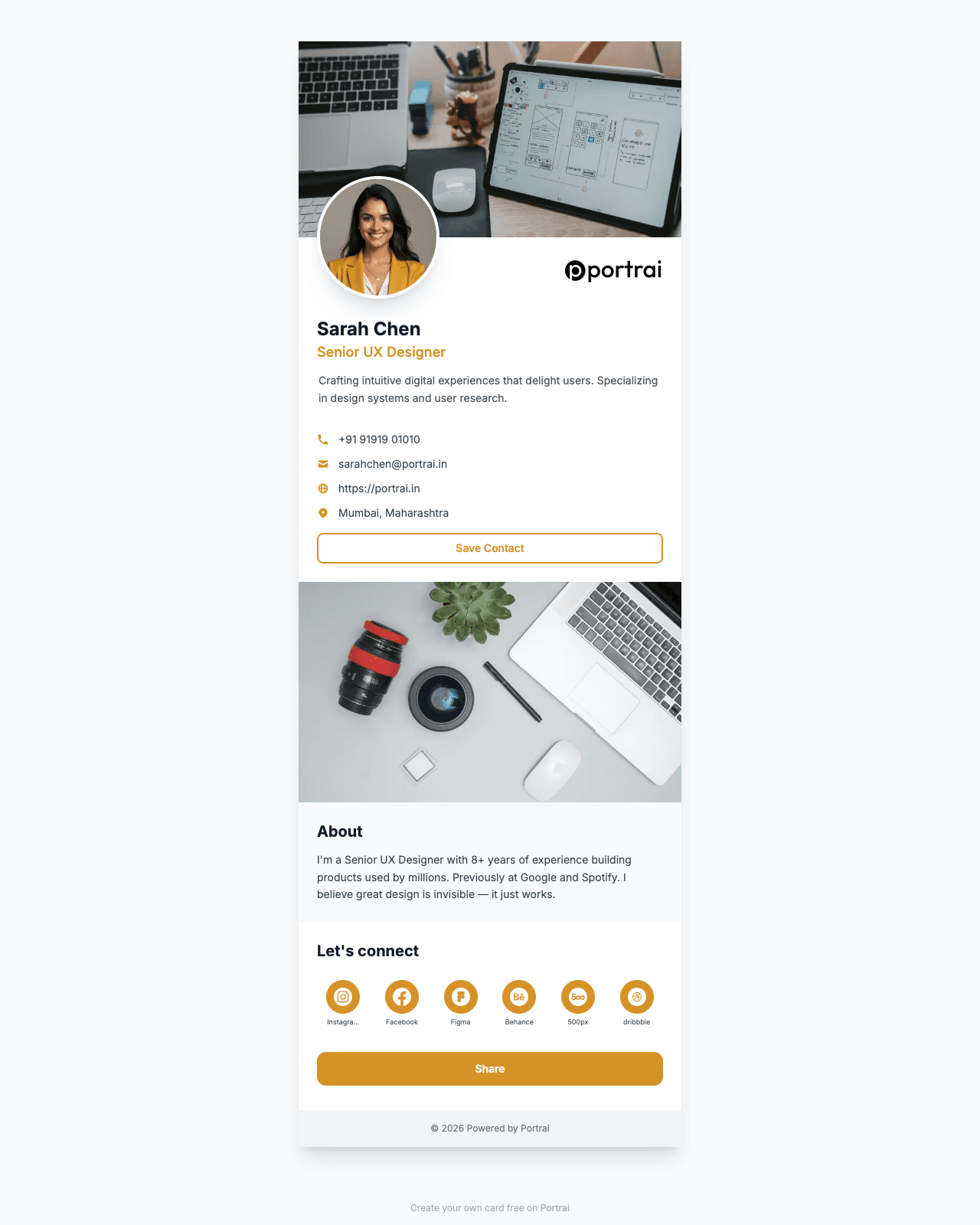
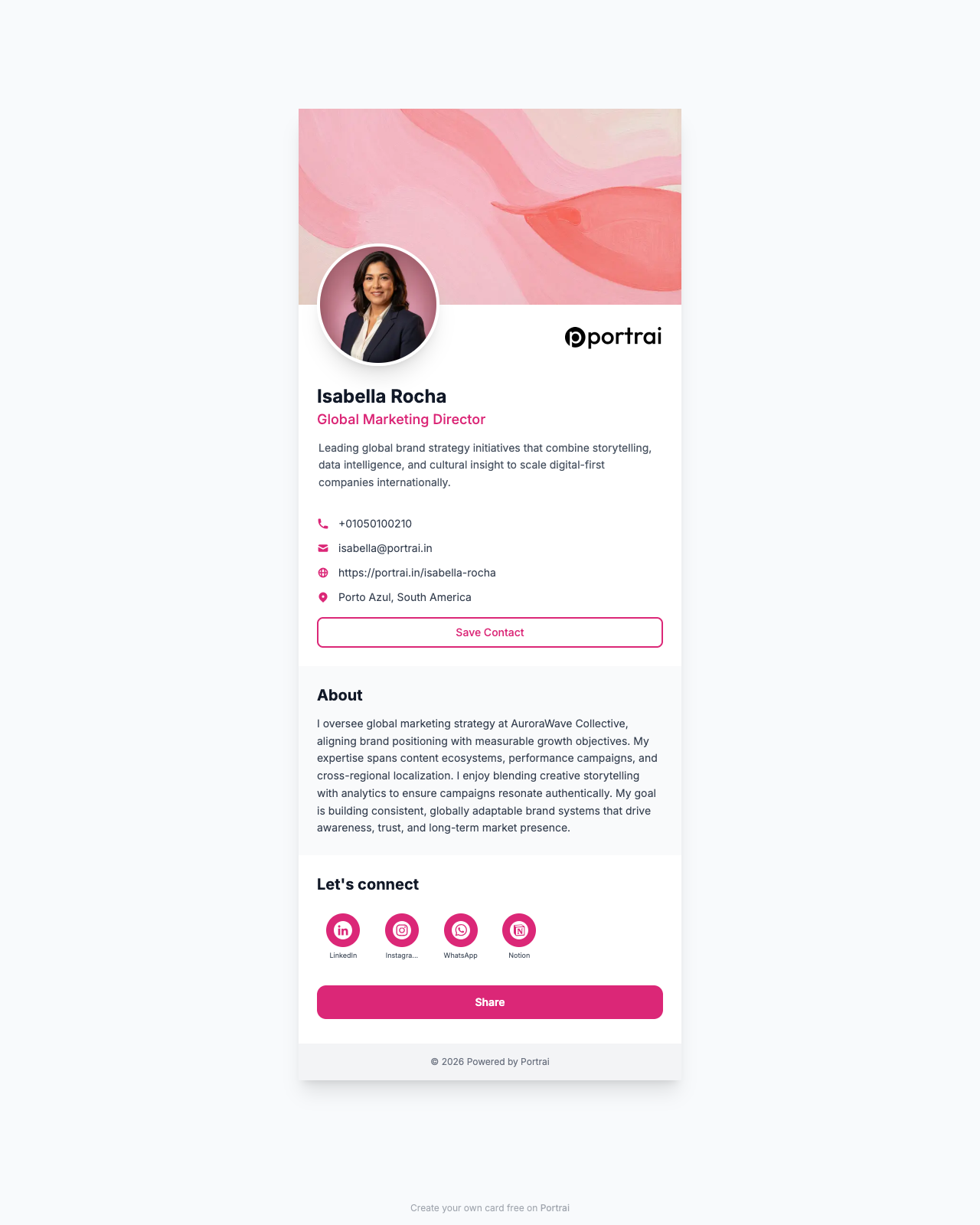
A paper card is a snapshot. A digital card is a live document. Change your role, number, Calendly link, or handle on whatever platform matters this quarter, and every card you've ever shared updates with it. People who scanned your QR six months ago see the new version when they revisit. Nobody is calling a number that hasn't been yours since 2024. Sounds small until you've had to email forty people saying "ignore the card I gave you, here's my new info."
2. They tell you what's working
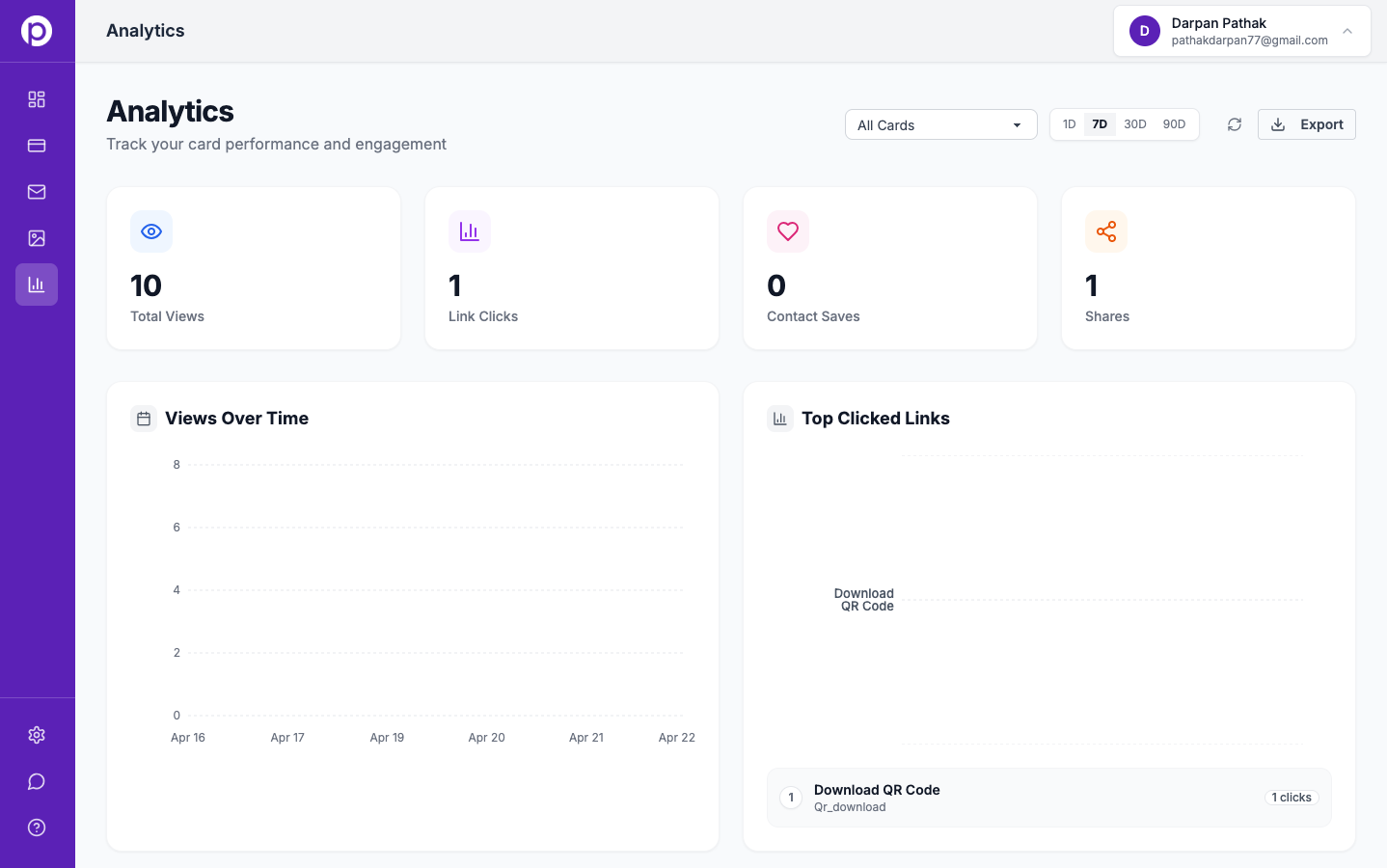
This is the change Portrai users mention most often. When you check your card analytics after a week of meetings, you see how many people opened the card, which links they clicked first, how many saved your contact, and where scans came from. That's a feedback loop. Forty scans at a conference but only three saves means the bio isn't landing or the Save Contact button isn't prominent enough. Everyone clicking Calendly first means that's the CTA that's working — promote it. You stop optimizing for vibes and start treating each share like a small experiment.
3. They share through any surface
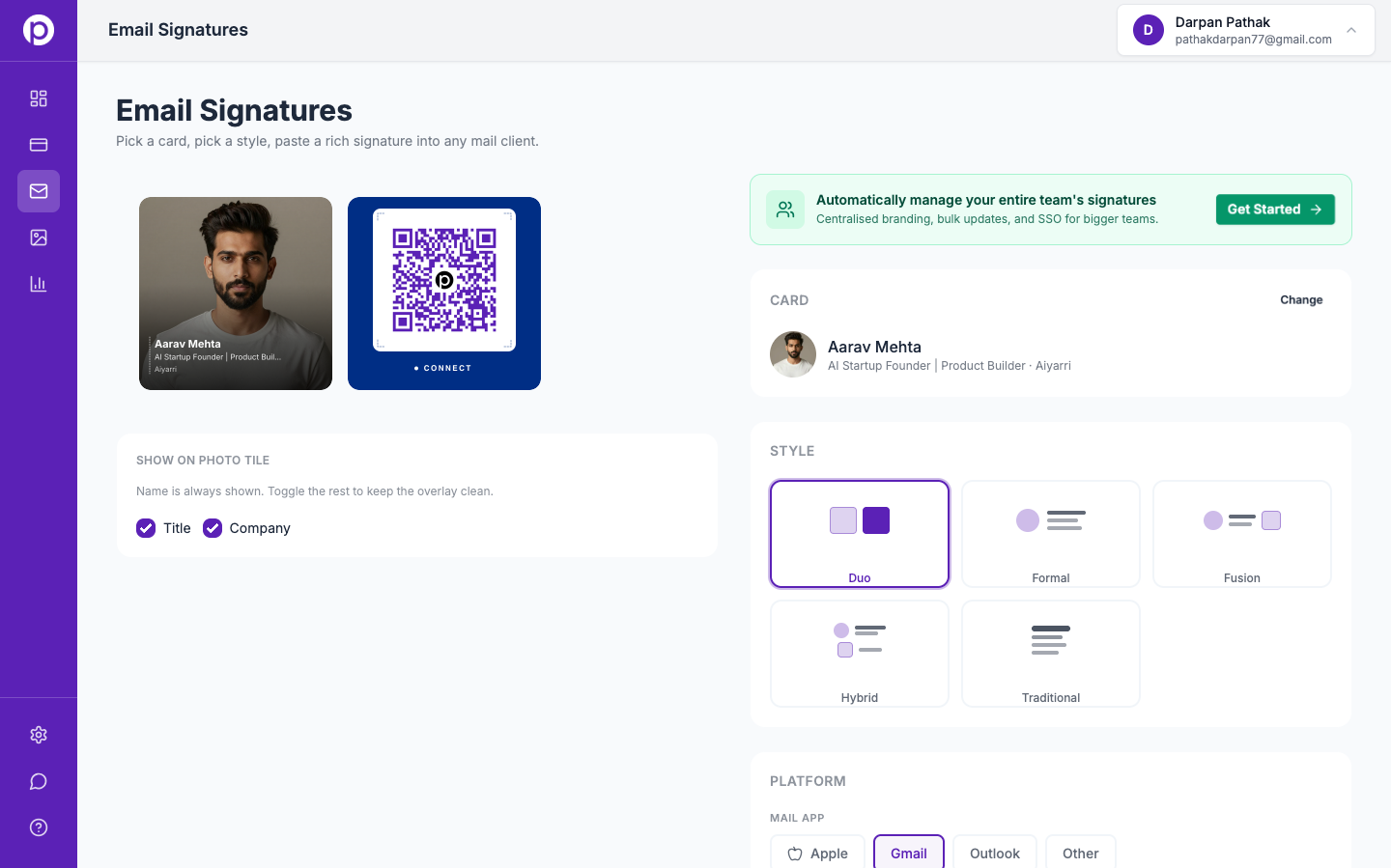
A paper card has one delivery mechanism: hand it over in person. A digital card has roughly seven — QR on your phone wallpaper, lanyard, or laptop sticker; the short URL pasted into DMs or texts; an email signature on every message you send; a branded Zoom or Google Meet background that turns every video call into a passive scan opportunity; NFC tap-to-share if the recipient has the right device. Same identity, different surface for every context.
4. They scale with your team
For a solo operator this matters less. The moment you have a sales or recruiting team handing out cards under the same brand, paper becomes painful — reprints when someone leaves, inconsistent designs across reps, no way to know which rep generated engagement. Digital solves it: central template, branded layout, per-rep analytics, swap a leaver's card off the live URL the day they exit. The sales teams use case goes deeper.
What paper cards still do better
I'm not going to pretend paper has nothing going for it. It's lasted a century because it does some things well, and an honest comparison has to name them.
Tangible artifact. A well-designed paper card is a physical object you can put on a desk. It's harder to forget than a link. Luxury brands, designers, and senior executives still hand out heavy-stock, letterpress cards because the card itself is part of the brand experience. A QR code can't replicate that.
No tech dependency. Phone battery dead, no signal, conference WiFi is terrible — paper works in all of those. Digital quietly assumes the recipient has a phone, a camera, a connection, and a few seconds of attention. Usually true. Not always.
Aesthetic and craft. A black card with foil-embossed type is a design object. Digital can be beautifully designed too, but it lives on a screen — where every other experience also lives. Paper competes for a different kind of attention.
Cultural and industry expectation. In Japan, the formal exchange of meishi is still a meaningful ritual. In legal, real estate, and parts of finance, handing over a paper card reads as professionalism. A QR code in those contexts can read as careless rather than modern.
If you're in any of those situations, the answer isn't "paper is dead." The answer is "use both."
How to make the switch
Switching cold is uncomfortable. Don't do that. Here's the three-step plan I recommend.
1. Pick a digital card tool. Pick one with a clean URL, exportable contact data (vCard download), QR code generation, and basic analytics out of the box. The best digital business card apps post covers the main contenders, and the compare page lays out features side by side. We're partial to Portrai — use whatever fits.
2. Run a 30-day bridge period. Hand out both. When you give someone a paper card, also say "scan this for the live version" and show your QR. You get to track which one actually generates follow-ups — the analytics will tell you within a month — and you stop feeling like you're abandoning a habit, just upgrading it.
3. Decommission paper for new contexts. Once you've seen the data, retire paper where digital wins outright. Conferences, meetups, online intros, anywhere young or technical — go digital-only. Keep paper for legal, real estate, conservative client meetings, and markets where card exchange is a ritual. The real win isn't "paper is dead," it's "paper is now reserved for contexts where it pays off."
For sales teams looking to roll digital cards out at scale, the sales teams use case covers the team-level mechanics.
An honest take
Disclosure: Portrai is the platform behind this article. Weight that accordingly. But here's the case even setting that aside.
Paper business cards are not dying tomorrow, and probably won't be dead in five years. They will become a niche format — used in specific industries, cultures, and high-craft contexts where the physical artifact is part of the message. For everyone else, they'll quietly stop making sense, the way fax machines did — not because anyone announced it, but because the practical case dissolved.
The case for switching now is not "the future is here." It's simpler: the people you most want to network with — modern, connected, data-driven, mobile-first — have already switched. They expect a link, not a wallet shuffle. If your card adds friction to that flow, you become the person they meant to follow up with and didn't. You don't want to be that person. The math is the math.
FAQs
Are paper business cards completely obsolete?
No, and anyone who tells you otherwise is selling something. Paper still has a real role in formal client meetings, in industries like legal, real estate, and parts of finance, and in cultures with strong card-exchange rituals. What's changing is the default — for most professionals, digital is now the better starting point and paper is the optional add-on.
Do I need NFC for a digital card to be useful?
No. NFC is nice when both devices support it, but it's not required. QR works on every modern phone, and a short URL works in any chat, email, or DM. Most card shares we see happen via QR or pasted link.
What about industries that still prefer paper?
Legal, real estate, parts of finance, and senior B2B with formal client-meeting culture still lean paper. The honest answer: carry both. Hand over the paper card, then say "scan this for the rest" and show your QR. Read the room.
Will my recipient need to install an app?
No. A digital card opens in any browser when someone scans or taps the link. No download, no signup, no permission prompt. They land on a page, tap Save Contact, and your vCard goes into their address book.
Ready to create your digital business card?
Join professionals who use Portrai to network smarter.
Get Started Free